Showing posts with label tutorial. Show all posts

Download Video Youtube

Kembali lagi nih sama kontributor learning.Kali ini saya akan memberikan tutorial mengenai cara download Video Dari Youtube Ke Komputer Dengan cepat.kenapa ko bisa cepet?? karena saya di sini pake Aplikasi Freeware jadi temen-temen cuman Download 1 kali terus bisa Download Video dari 40+ situs dengan mudah termasuk Youtube.com di dalamnya.
Ada beberapa File Yang Harus Temen-Temen Download yang pasti Aplikasinya dan tutorialnya hhe :D
Aplikasinya bisa Temen-Temen download disini
Dan Video Tutorialnya Bisa Temen-Temen Download Di sini
Jika Temen-Temen masi kebingungan dengan Tutorial yang saya berikan temen-temen bisa Tinggalkan Pesan di Artikel ini dengan cara Memberi Komentar dan isikan Alamat Email temen-temen biar saya bisa menghubungi temen-temen.
Keep Smile dan Selalu Berusaha

Selamat Mencoba dan semoga Berhasil

Membuka file situs secara offline

kembali lagi bersama saya learning :) .untuk kesempatan kali ini saya akan memberikan cara untuk menyimpan sebuah Halam site agar bisa temen-temen buka lagi dengan mendekati tampilan yang sempurna.kelebihan dari menggunakan aplikasi ini temen-temen ga usah save page satu-satu bisa cuman tinggal masukin halaman situsnya.
untuk kali ini Pakarny.info memiliki kebijakan baru untuk Mengupload ke youtube agar temen-temen bisa Streaming Video Tutorialnya.tapi saya juga akan memberikan link downloadnya untuk temen-temen yang ingin memiliki Video Tutorialnya.sebelumnya saya akan berikan link download buat aplikasi PageNest Di sini.
Temen-temen bisa download juga di sini

Install anti virus flash disk

Selamat datang lagi di learning untuk kali ini saya akan memberikan sebuah tutorial mengenai cara install Antivirus di USB Flashdisk.

Tutorial ini sangat berfungsi bagi temen-temen yang sering pergi ke warnet atau sering transfer data menggunakan Flash disk untuk melindungi Flash disknya dari serangan Virus.
Sebelum download Atau Streaming Video Tutorialnya temen-temen bisa download dulu aplikasinya yang bernama Mx One disini
atau bisa download Video Tutorialnya Disini

Install Ubunti 10 Desktop

Kembali lagi bersama Saya masi bersama saya.kali ini saya membuat video tutorial yang di request oleh salah satu Pengunjung blog ini yang berjudul Instalasi Ubuntu Desktop 10.10

Sebelumnya Temen-temen pengguna AMD bisa download Ubuntu 10.10 Desktop Khusus AMD dan pengguna INTEL bisa download Ubuntu 10.10 Desktop i386.
Untuk Kali ini saya tidak upload Video ke Youtube dikarenakan Video Tutorialnya Terlalu panjang di Upload ke youtube.tetapi temen-temen bisa download Tutorialnya disini

Melihat Spesifikasi Computer

Selamat datang lagi bersama saya.pada kesempatan kali ini saya akan memberika tips mudah cara melihat spesifikasi komputer dengan mudah dan hasilnya lebih baik.

Pertama-tama temen-temen download dulu aplikasinya yang bernama Speccy di sini
Setelah Itu Silahkan menyaksikan Ato MenDownload Video Tutorialnya :)
Download

Cara Menggabungkan 2 file

Assalamualaikum.Saya Asep maja akan memberikan sebuat Tutorial yang cukup sederhana yaitu menggabungkan 2 File menjadi 1.intinya temen-temen bisa menyimpan File Lain ke Sebuah foto.
Untuk Lebih Jelasnya temen-temen bisa menyaksikan Video Tutorialnnya

Download

Mengganti Drive Letter

Kembali lagi bersama saya Learning-e.Pada Video tutorial kali ini saya akan memberikan sebuah cara untuk mengubah Driver seperti C:,D:,E:

Download

SEO Title Tag On Blogspot

Title on blog just like visitor interest . Good title attract more visitors and it is significant part of SEO. To gain more traffic your title should have attractive keywords, should not be too long and important words should come first (keyword prominence).


In this article you will find free guide how to increase blog traffic with title change of each page of your blogger explained step by step. With title change explained in this article my blog have visit growth more than 40%. Let's talk about how blogspot post titles are generated. In blogger post blog title come first followed by post title.

Horizontal Jquery Menu

This article will help you to add horizontal menu with jquery on blogger. More precise, how to implement jQuery drop down menu for blogger (blogspot)? You can find step by step guide in this article. Sometimes it can be called blogger menu bar, blogger horizontal navigation menu or horizontal navbar.


This article can be useful and for visitors who do not want to install drop down menu on blogger but it is primarily focused on blogger users. In this guide jQuery menu plugin by Joel Birch is used.


First let's explain what jQuery drop down multi level menu mean word by word.


  • jQuery - jQuery is designed to change the way that you write JavaScript. It have powerful visual effects and allow our drop down menu to work
  • drop down menu - a list of options that appears below the item when the computer user clicks on it or hover mouse pointer over item
  • multi level menu - menu from this tutorial is 3 levels depth. Multi level means that you have menus and submenus. For 3 level we have menu items which have submenu items and submenu items can have own submenu items


Example of simple jQuery drop down menu:


Digg Button in single Post

Digg buttonHow to add Digg Button To your every single post on blogger? . this article will help you with simple steps. With Digg button you have a better chance your post will be digged and get you more web traffic. In this article reader can also find how to add Digg button on top or bottom of each post and how to align Digg button on left or right side of posts.
Example of Digg button:

How to add Digg button to every blogspot post

Spoiler with Jquery on Blogspot

You find some cool jQuery features but don't know how to include jQuery code into your blogspot blog? Here you will find two steps needed to jQuery work on your blog.

Two steps for implement jQuery on blogspot post


  1. Reference jQuery library in your blogspot post
  2. To provide jQuery work you must reference jQuery library. One option is to reference on jquery-1.3.2.min.js file on google code.

Fancybox JQuery Di Blogspot

Fancybox dengan Jquery adalah efek jendela munculan (pop up) dengan menggunakan JQuery yang dikembangkan Janis Skarnelis. Berbeda dengan jendela munculan yang biasa kita lihat, Fancybox mempunyai desain elegan yang menyerupai pop up pada Mac OS serta efek transisi yang menarik. Selain dapat menampilkan gambar, Fancybox juga mampu menampikan halaman eksternal dengan Iframe. Lebih lanjut, silakan lihat mampir kehalaman demo.

Cara Penerapan

Make Pc Router With Ubuntu Server

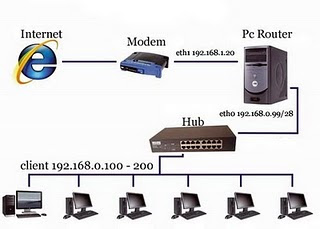
Pc Router is a PC (computer) that made a router.Yang which itself Router is a networking tool that sends data packets through a network or the Internet to the destination is through a process of routing.


Router functions as a liaison between two or more networks to carry data from one network to build a Pc lainnya.Untuk I use my Router Operating System (OS), Linux Ubuntu Server you can download 9:04 disni
.

How To Make Windows XP faster

It is often and probably have a lot to know, is just simply to remind it. many different ways that made for windows XP let him walk faster and stable, Want a Vista capable * speknya not yet requested is still very high:

A new PC also requires special touches, before it is ready to be PC perfect. to Increase Performance of PC into Se Optimal possible, and we work with computers to be fun, because the PC so quickly and rarely hangs for various applications.

This is one trick that can be applied;

Hack Registry Windows XP

The way that computers registry setting not only on windows xp computer only, melaikan also you can do on the version of windows 98 or on windows vista. Okay, from the writing ribed its own over time and you already can not wait to registry settings this way, we'll just start. OK?

1. Click the Start button> Run.
2. Type regedit and press Enter after being in the Run window.
3. In Registry Editor, select File menu> Export.
4. After the Export Registry File appears, enter the file name into the File Name, such as backup-registry and so forth.
5. press the Save button.

Accelerating Registry Update
Press the Start> Log Off> Log Off.

Changing Wallpaper
HKEY_CURRENT_USER / Control Panel / Desktop
Double click on the wallpaper and enter the path to the desired image in Value Data.

Fix Windows XP

It is often and probably have a lot to know, is just simply to remind it. many different ways that made for windows XP let him walk faster and stable, Want a Vista capable * speknya not yet requested is still very high:

A new PC also requires special touches, before it is ready to be PC perfect. to Increase Performance of PC into Se Optimal possible, and we work with computers to be fun, because the PC so quickly and rarely hangs for various applications.

Membuat Recent Comment

Cara membuat recent comment atau komentar terbaru dapat saja anda lakukan dengan cara menambahkan widget yang telah tersedia, namun recent komentar pada kali ini berbeda lebih bagus dan di awali dengan tanda bullet, berikut cara membuat recent komen atau komentar terbaru.

1. Login ke akun blogger
2. Klik tata letak tambahkan widget dan pilih html
3.Copy kode berikut, dan masukkan ke dalam widget HTML/Javascript di elemen halaman

password pada posting blogspot

Bagaimana membuat posting private?
Bagaimana cara encrypt Blogspot post?
Bagaimana cara membuat posting blog dengan password?

berikut adalah translate dari artikel sebelum nya yang ditulis dalam versi english, CEK DISINI.

Langkah langkah :

Customisasi profil facebook

beberapa waktu lalu facebook mengubah tampilan profil nya. sebagian orang tidak suka akan tampilan baru ini, dan agak canggung pada saat pertama kali penggunaan profil baru.
kali ini saya ingin berbagi tips bagaimana membuat tampilan profil kita tampak indah.

apa yang saya maksud? silahkan lihat gambar di bawah.

Forum blogspot terintegrasi

Visit : id-blogspot.vanillaforums.com
Demo : http://vannilaforums.blogspot.com/p/forum-b-spot.html

kata forum tidaklah asing lagi di telinga kita. Forum adalah tempat berkumpulnya komunitas komunitas tertentu dengan bahasan bahasan tertentu pula. seperti kaskus.us yang angin angin nya menjadi forum terbesar di indonesia.forum cara yang tepat untuk membangun komunitas antar blogger. saat ini kebanyakan pemilik blog menggunakan fanpage Facebook.com untuk membangun komunikasi mereka dengan fans fans artikel mereka.
walau itu gratis namun cukup meningkatkan popularitas blog kita. bayangkan saja suatu blog yang fan page nya memiliki ribuan likers dan memiliki ribuan followers. pasti semua blogger ingin seperti itu.selain facebook ada juga forum komunitas blogger yang menggunakan hosting dan software forum building(ada free & berbayar ).